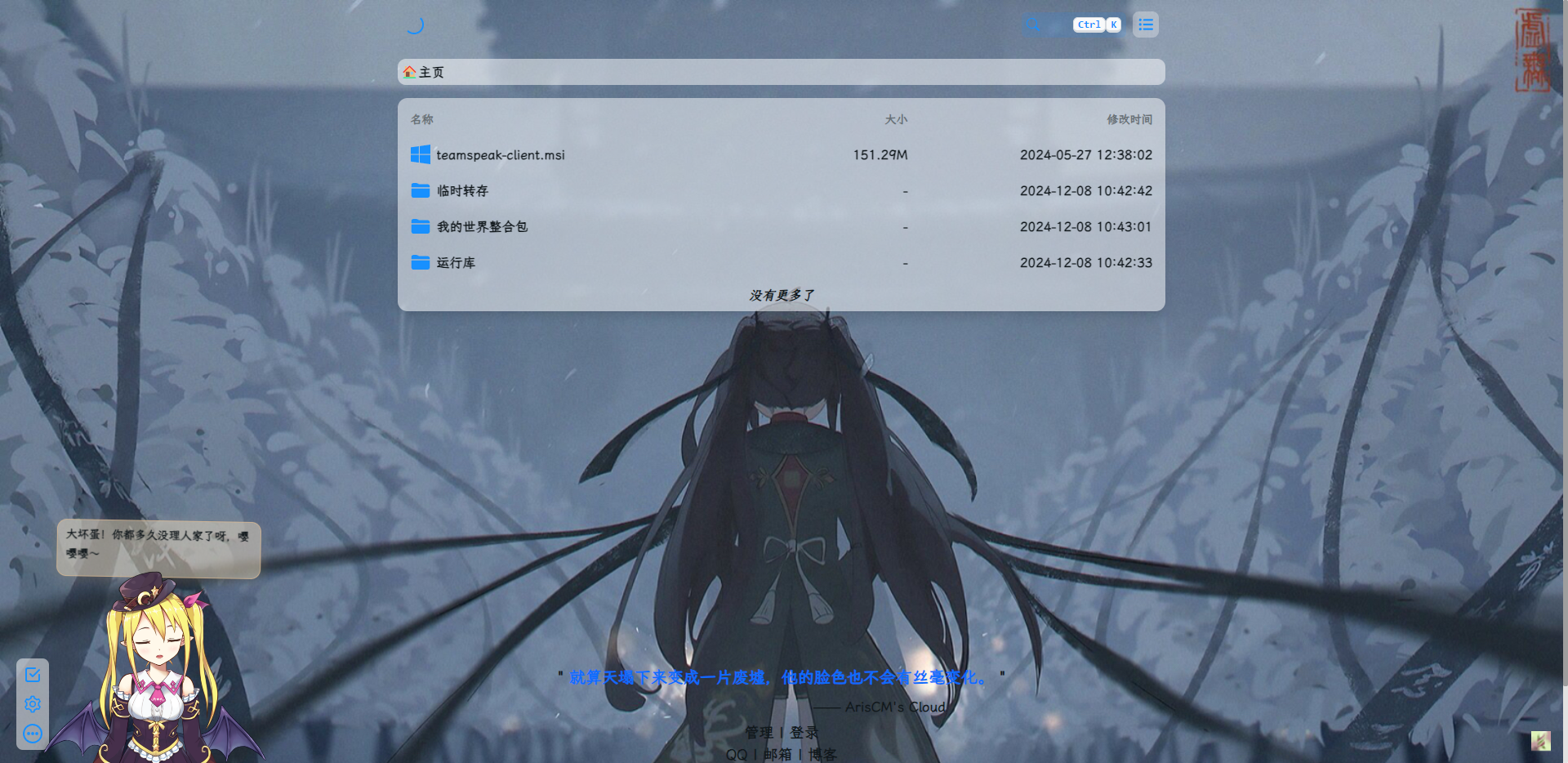
Alist的访问优化
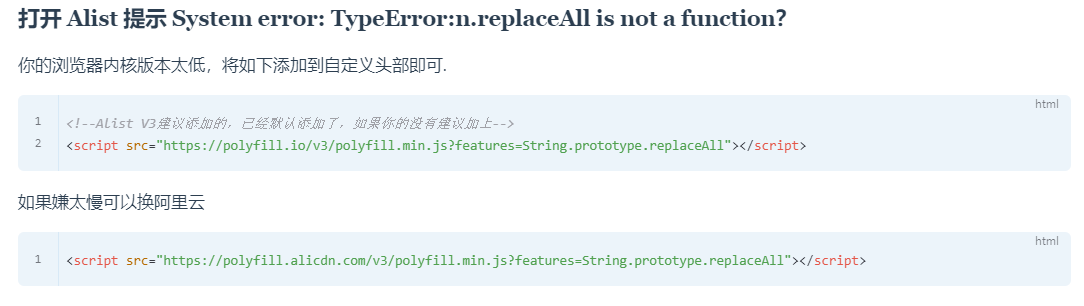
最初Alist刚部署好的时候访问速度还挺快,后续几个月后莫名其妙的需要白屏加载很久才能进入,后经查阅Alist的官方文档(戳我访问)发现了以下内容
同时在安稳大佬的文档里也看到了相关的内容
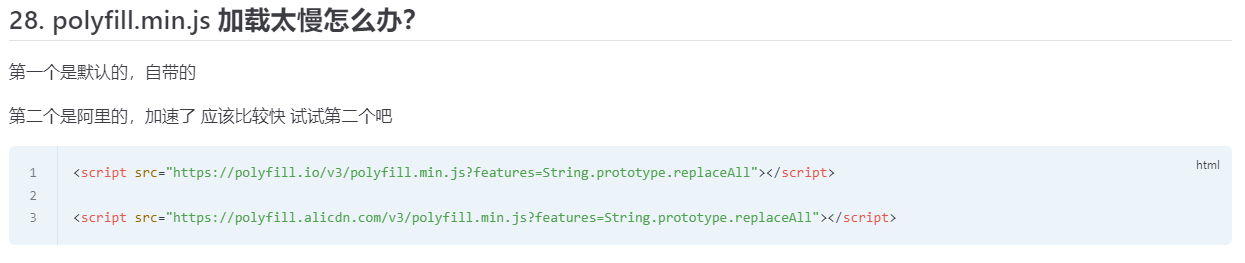
经过排查,确实是polyfill.min.js加载慢的原因,将其更换为阿里云的节点后访问速度几乎是秒开
传闻,将polyfill.min.js的加载节点改为阿里云还可以解决PDF文件无法在线预览的问题(具体是真是假我没去测试,诶嘿)
<!--Alist V3默认旧的自定义头部内容-->
<script src="https://polyfill.io/v3/polyfill.min.js?features=String.prototype.replaceAll"></script>

<!--更换阿里云节点-->
<script src="https://polyfill.alicdn.com/v3/polyfill.min.js?features=String.prototype.replaceAll"></script>
Alist的美化
自定义头部
“一起看”功能
引入“一起看”功能,具体用法详见这里,通常情况下在自定义头部直接引用以下代码即可添加“一起看”功能,需要注意的是,如果你网站的视频播放器嵌套在 iframe, 并且 iframe 中的网页域名和网站域名不相同,你需要将代码添加到 iframe 网页中。
<!--添加一起看功能-->
<script src="https://2gether.video/release/extension.website.user.js"></script>引入代码后刷新页面,会发现Alist的工具栏等内容默认是在右侧的,和“一起看”功能的图标重叠了,这时候引入以下代码将Alist的工具栏修改至左侧即可解决,该解决方案源自这里
<!--解决一起看功能图标与Alist工具栏冲突-->
<script>
    document.addEventListener("DOMContentLoaded", () => {
        const seAList = document.createElement("style");
        seAList.innerHTML = `
    .left-toolbar-box {
        left: var(--hope-space-5);
        right: auto;
    }
`;
        document.body.appendChild(seAList);
    });
</script>
添加看板娘
添加看板娘的部分算是一波三折了,我本身对html、php、js等语言均不熟悉,纯粹是兴趣驱使的去尝试搭建各种东西,而且我又不想用别的大佬建好的看板娘API,选择了自建看板娘API,结果是上班摸鱼折腾了两三天才解决,后面会单独出一篇文章简单聊聊
<!--引入看板娘-->
<script src="https://{your URL}/live2d/v2/autoload.js"></script>
自定义页面失焦后的标题变化
<!--自定义页面失焦后的标题变化-->
<script type="text/javascript">
    window.onblur = function () {
        document.title = "盯...|・ω・`)";
    };
    window.onfocus = function () {
        document.title = "欢迎回来!| 鸢羽_Rliy的Alist资源库";
    }
</script>以下美化内容源自安稳大佬(戳我访问),修改部分内容适应我的需求,并去除了部分我用不上的内容
替换字体、设置随机背景图、设置透明列表、优化图标样式、隐藏底部入口
<!--引入字体,全局字体使用-->
<link rel="stylesheet" href="https://npm.elemecdn.com/[email protected]/lxgwwenkai-regular.css"/>

<style>
    /* 去除通知栏 右上角 X */
    .notify-render .hope-close-button {
        display: none;
    }

    /*白天背景图*/
    .hope-ui-light {
        background-image: url("https://{your URL}/image.php?msg=%E7%94%B5%E8%84%91%E5%8A%A8%E6%BC%AB%E5%A3%81%E7%BA%B8") !important;
        background-repeat: no-repeat;
        background-size: cover;
        background-attachment: fixed;
        background-position-x: center;
    }

    /*夜间背景图*/
    .hope-ui-dark {
        background-image: url(https://{your URL}/image.php?msg=%E7%94%B5%E8%84%91%E5%8A%A8%E6%BC%AB%E5%A3%81%E7%BA%B8) !important;
        background-repeat: no-repeat;
        background-size: cover;
        background-attachment: fixed;
        background-position-x: center;
    }

    /*主列表夜间模式透明,50%这数值是控制透明度大小的*/
    .obj-box.hope-stack.hope-c-dhzjXW.hope-c-PJLV.hope-c-PJLV-iigjoxS-css {
        background-color: rgb(0 0 0 / 50%) !important;
    }

    /*readme夜间模式透明,50%这数值是控制透明度大小的*/
    .hope-c-PJLV.hope-c-PJLV-iiuDLME-css {
        background-color: rgb(0 0 0 / 50%) !important;
    }

    /*主列表透明*/
    .obj-box.hope-stack.hope-c-dhzjXW.hope-c-PJLV.hope-c-PJLV-igScBhH-css {
        background-color: rgba(255, 255, 255, 0.5) !important;
    }

    /*readme透明*/
    .hope-c-PJLV.hope-c-PJLV-ikSuVsl-css {
        background-color: rgba(255, 255, 255, 0.5) !important;
    }

    /*顶部右上角切换按钮透明*/
    .hope-c-ivMHWx-hZistB-cv.hope-icon-button {
        background-color: rgba(255, 255, 255, 0.3) !important;
    }

    /*右下角侧边栏按钮透明*/
    .hope-c-PJLV-ijgzmFG-css {
        background-color: rgba(255, 255, 255, 0.5) !important;
    }


    /*白天模式代码块透明*/
    .hope-ui-light pre {
        background-color: rgba(255, 255, 255, 0.1) !important;
    }

    /*夜间模式代码块透明*/
    .hope-ui-dark pre {
        background-color: rgba(255, 255, 255, 0) !important;
    }

    /*左侧侧边栏目录*/
    /*白天模式*/
    .hope-ui-light .hope-c-PJLV-ieGWMbI-css {
        background: rgba(255, 255, 255, 0.3) !important;
    }

    /*夜间模式*/
    .hope-ui-dark .hope-c-PJLV-ieGWMbI-css {
        background-color: rgb(0 0 0 / 50%) !important;
    }

    /* 返回顶部 */
    .hope-c-PJLV-ihVEsOa-css {
        background: rgba(255, 255, 255, 0.3) !important;
    }

    .hope-ui-dark .hope-c-PJLV-ihVEsOa-css {
        background-color: rgb(0 0 0 / 50%) !important;
    }

    /*正常情况未使用吸附功能*/
    /*导航条*/
    /*白天模式*/
    .hope-ui-light .hope-c-PJLV-idaeksS-css {
        background-color: rgba(255, 255, 255, 0.5) !important;
        border-radius: 10px !important;
    }

    /*夜间模式*/
    .hope-ui-dark .hope-c-PJLV-idaeksS-css {
        background-color: rgb(0 0 0 / 50%) !important;
        border-radius: 10px !important;
    }

    /*顶栏*/
    .hope-c-PJLV-ikaMhsQ-css {
        background: rgba(255, 255, 255, 0) !important;
    }


    /* 吸附到页面顶部 */
    /*顶部*/
    .hope-c-PJLV-icWrYmg-css {
        background: rgba(255, 255, 255, 0) !important;
    }

    /*导航条*/
    .hope-c-PJLV-icKsjdm-css::after {
        background: rgba(255, 255, 255, 0) !important;
    }

    /*白天模式*/
    .hope-ui-light .hope-c-PJLV-icKsjdm-css {
        background-color: rgba(255, 255, 255, 0.5) !important;
        border-radius: 10px !important;
    }

    /*夜间模式*/
    .hope-ui-dark .hope-c-PJLV-icKsjdm-css {
        background-color: rgb(0 0 0 / 50%) !important;
        border-radius: 10px !important;
    }

    /*仅吸附导航栏*/
    /*导航条*/
    .hope-c-PJLV-ifdXShc-css::after {
        background: rgba(255, 255, 255, 0) !important;
    }

    /*白天模式*/
    .hope-ui-light .hope-c-hrsMRY {
        background-color: rgba(255, 255, 255, 0.5) !important;
        border-radius: 10px !important;
    }

    /*夜间模式*/
    .hope-ui-dark .hope-c-hrsMRY {
        background-color: rgb(0 0 0 / 50%) !important;
        border-radius: 10px !important;
    }


    /*底部CSS,.APP .tanle这三个一起的*/
    dibu {
        border-top: 0px;
        position: absolute;
        bottom: 0;
        width: 100%;
        margin: 0px;
        padding: 0px;
    }

    .App {
        min-height: 85vh;
    }

    .table {
        margin: auto;
    }

    /*去掉底部*/
    .footer {
        display: none !important;
    }

    /*全局字体*/
    * {
        font-family: LXGW WenKai
    }

    * {
        font-weight: bold
    }

    body {
        font-family: LXGW WenKai;
    }
</style>
搜索框设置毛玻璃效果
<style>
    /*白天模式 搜索主体+毛玻璃*/
    .hope-ui-light .hope-c-PJLV-iiBaxsN-css {
        background-color: rgba(255, 255, 255, 0.2) !important;
        backdrop-filter: blur(10px) !important;
    }

    /*白天模式 搜索栏输入框+毛玻璃*/
    .hope-ui-light .hope-c-kvTTWD-hYRNAb-variant-filled {
        background-color: rgba(255, 255, 255, 0.2) !important;
        backdrop-filter: blur(10px) !important;
    }

    /*白天模式 搜索按钮+毛玻璃*/
    .hope-ui-light .hope-c-PJLV-ikEIIxw-css {
        background-color: rgba(255, 255, 255, 0.2) !important;
        backdrop-filter: blur(10px) !important;
        padding: var(--hope-space-1) !important;
    }

    /*夜间模式搜索主体+毛玻璃*/
    .hope-ui-dark .hope-c-PJLV-iiBaxsN-css {
        background-color: rgb(0 0 0 / 10%) !important;
        backdrop-filter: blur(10px) !important;
    }

    /*夜间模式搜索栏+毛玻璃*/
    .hope-ui-dark .hope-c-kvTTWD-hYRNAb-variant-filled {
        background-color: rgb(0 0 0 / 10%) !important;
        backdrop-filter: blur(10px) !important;
    }

    /*夜间模式 搜索按钮+毛玻璃*/
    .hope-ui-dark .hope-c-PJLV-ikEIIxw-css {
        background-color: rgb(0 0 0 / 10%) !important;
        backdrop-filter: blur(10px) !important;
        padding: var(--hope-space-1) !important;
    }
</style>
自定义鼠标样式
<style>
    /*较为个性化的鼠标指针样式,可结合个人需要自行修改*/
    body {
        cursor: url(https://{your URL}/pic/2024/05/24/6650105e5be36.png), default;
    }

    select {
        cursor: url(https://{your URL}/pic/2024/05/24/6650105c767cf.png), pointer;
    }

    button, a:hover {
        cursor: url(https://{your URL}/pic/2024/05/24/6650105c767cf.png), pointer;
    }

    input {
        cursor: url(https://{your URL}/pic/2024/05/24/6650105d9d0b5.png), text;
    }

    textarea, input:focus {
        cursor: url(https://{your URL}/pic/2024/05/24/6650105d9d0b5.png), text;
    }

    code {
        cursor: url(https://{your URL}/pic/2024/05/24/6650105d3e072.png), default;
    }

    pre > code {
        cursor: url(https://{your URL}/pic/2024/05/24/6650105d3e072.png), default;
    }
</style>
自定义内容
修改底部的管理和登陆入口样式、添加一言、QQ、邮箱、博客等地址、添加备案信息
<!--延迟加载-->
<!--如果要写自定义内容建议都加到这个延迟加载的范围内-->
<div id="customize" style="display: none;">
    <div>
        <center class="dibu">
            <div style=" line-height: 35px;font-size: 15pt;font-weight: bold;">
                <span>
                    "
                    <span style="color: rgb(13, 109, 252); font-weight: bold;" id="hitokoto">
                        <a href="#" id="hitokoto_text">
                            "鸢尾之羽,长久思念."
                        </a>
                    </span> "
                </span>
                <p style="margin-left: 15rem;font-size: 15pt;">
                    <small>
                        —— ArisCM's Cloud
                    </small>
                </p>
            </div>

            <div style="font-size: 18px; font-weight: bold;">
                <!--后台入口-->
                <span class="nav-item">
                    <a class="nav-link" href="/@manage">
                        <i class="fa-solid fa-folder-gear" style="color:#409EFF;" aria-hidden="true">
                        </i>
                        管理 |
                    </a>
                </span>
                <span class="nav-item">
                    <a class="nav-link" href="/@login">
                        <i class="fa-solid fa-folder-gear" style="color:#409EFF;" aria-hidden="true">
                        </i>
                        登录
                    </a>
                </span><br/>
                <!--信息-->
                <span class="nav-item">
                    <a class="nav-link" href="tencent://message/?uin={your QQ}"
                       target="_blank">
                        <i class="fab fa-qq" style="color:#409EFF" aria-hidden="true">
                        </i>
                        QQ |
                    </a>
                </span>
                <span class="nav-item">
                    <a class="nav-link" href="mailto:{your mail}" target="_blank">
                        <i class="fa-duotone fa-envelope-open" style="color:#409EFF" aria-hidden="true">
                        </i>
                        邮箱 |
                    </a>
                </span>
                <span class="nav-item">
                    <a class="nav-link" href="https://{your URL}/" target="_blank">
                        <i class="fas fa-edit" style="color:#409EFF" aria-hidden="true">
                        </i>
                        博客
                    </a>
                </span>
                <br/><br/>
                <!--添加备案信息-->
                <span class="nav-item">
                    <a class="nav-link" href="https://beian.miit.gov.cn/#/Integrated/index" target="_blank">
                        <i class="fa-solid fa-shield-check" style="color:#409EFF;" aria-hidden="true">
                        </i>
                        备案号
                    </a>
                </span>
            </div>
        </center>
        <br/>
        <br/>
    </div>

    <!--一言API-->
    <script src="https://v1.hitokoto.cn/?encode=js&select=%23hitokoto" defer></script>
    <!--延迟加载范围到这里结束-->
</div>
<!--延迟加载配套使用JS-->
<script>
    let interval = setInterval(() => {
        if (document.querySelector(".footer")) {
            document.querySelector("#customize").style.display = "";
            clearInterval(interval);
        }
    }, 200);
</script>
预览效果如下:
添加网页点击特效(爱心版,与下面的核心价值观版二选一使用)
<!-- 网页鼠标点击特效 - 爱心 -->
<script type="text/javascript">
    !function (e, t, a) {
        function r() {
            for (var e = 0; e < s.length; e++) s[e].alpha <= 0 ? (t.body.removeChild(s[e].el), s.splice(e, 1)) : (s[
                e].y--, s[e].scale += .004, s[e].alpha -= .013, s[e].el.style.cssText = "left:" + s[e].x +
                "px;top:" + s[e].y + "px;opacity:" + s[e].alpha + ";transform:scale(" + s[e].scale + "," + s[e]
                    .scale + ") rotate(45deg);background:" + s[e].color + ";z-index:99999");
            requestAnimationFrame(r)
        }

        function n() {
            var t = "function" == typeof e.onclick && e.onclick;
            e.onclick = function (e) {
                t && t(), o(e)
            }
        }

        function o(e) {
            var a = t.createElement("div");
            a.className = "heart", s.push({
                el: a,
                x: e.clientX - 5,
                y: e.clientY - 5,
                scale: 1,
                alpha: 1,
                color: c()
            }), t.body.appendChild(a)
        }

        function i(e) {
            var a = t.createElement("style");
            a.type = "text/css";
            try {
                a.appendChild(t.createTextNode(e))
            } catch (t) {
                a.styleSheet.cssText = e
            }
            t.getElementsByTagName("head")[0].appendChild(a)
        }

        function c() {
            return "rgb(" + ~~(255 * Math.random()) + "," + ~~(255 * Math.random()) + "," + ~~(255 * Math
                .random()) + ")"
        }

        var s = [];
        e.requestAnimationFrame = e.requestAnimationFrame || e.webkitRequestAnimationFrame || e
            .mozRequestAnimationFrame || e.oRequestAnimationFrame || e.msRequestAnimationFrame || function (e) {
            setTimeout(e, 1e3 / 60)
        }, i(
            ".heart{width: 10px;height: 10px;position: fixed;background: #f00;transform: rotate(45deg);-webkit-transform: rotate(45deg);-moz-transform: rotate(45deg);}.heart:after,.heart:before{content: '';width: inherit;height: inherit;background: inherit;border-radius: 50%;-webkit-border-radius: 50%;-moz-border-radius: 50%;position: fixed;}.heart:after{top: -5px;}.heart:before{left: -5px;}"
        ), n(), r()
    }(window, document);
</script>
添加网页点击特效(核心价值观版,与上面的爱心版二选一使用)
<!-- 网页鼠标点击特效 - 核心价值观关键字 -->
<script>
    (function () {
        var a_idx = 0;
        window.onclick = function (event) {
            var a = new Array("❤富强❤", "❤民主❤", "❤文明❤", "❤和谐❤", "❤自由❤", "❤平等❤", "❤公正❤", "❤法治❤", "❤爱国❤",
                "❤敬业❤", "❤诚信❤", "❤友善❤");
            var heart = document.createElement("b"); //创建b元素
            heart.onselectstart = new Function('event.returnValue=false'); //防止拖动

            document.body.appendChild(heart).innerHTML = a[a_idx]; //将b元素添加到页面上
            a_idx = (a_idx + 1) % a.length;
            heart.style.cssText = "position: fixed;left:-100%;"; //给p元素设置样式

            var f = 13, // 字体大小
                x = event.clientX - f / 2 - 30, // 横坐标
                y = event.clientY - f, // 纵坐标
                c = randomColor(), // 随机颜色
                a = 1, // 透明度
                s = 0.8; // 放大缩小

            var timer = setInterval(function () { //添加定时器
                if (a <= 0) {
                    document.body.removeChild(heart);
                    clearInterval(timer);
                } else {
                    heart.style.cssText = "font-size:16px;cursor: default;position: fixed;color:" +
                        c + ";left:" + x + "px;top:" + y + "px;opacity:" + a + ";transform:scale(" +
                        s + ");";

                    y--;
                    a -= 0.016;
                    s += 0.002;
                }
            }, 15)
        }
        // 随机颜色
        function randomColor() {
            return "rgb(" + (~~(Math.random() * 255)) + "," + (~~(Math.random() * 255)) + "," + (~~(Math
                .random() * 255)) + ")";
        }
    }());
</script>
以上就是这几天上班摸鱼瞎折腾的美化结果了,最后的效果还是挺好看的,等过段时间又心血来潮了再去研究一下安稳大佬写的魔改教程,继续深度美化Alist